
Back Pain from Office & Desk Work: An Ergonomics Fix Guide
If your lower back aches by the end of a workday, your chair, desk, and monitor are usually the culprits — not a sudden injury. Here's how an office workstation loads your spine, the ergonomic changes that fix it (chair and lumbar support, monitor height, sit-stand, movement breaks), and how chiropractic care at Thrive Chiropractic in Troy, MI keeps desk-related back pain from rebuilding each afternoon.
Why Desk Work Loads Your Back
Back pain from office and desk work almost never starts with an injury. It builds over a full day spent at a workstation that quietly works against your spine — feeling fine in the morning and worse by mid-afternoon, because your low back has been under steady, uneven load the whole time. The reassuring part is that when a desk is the cause, a desk is also the cure: the same setup that creates the strain can be adjusted to remove it.
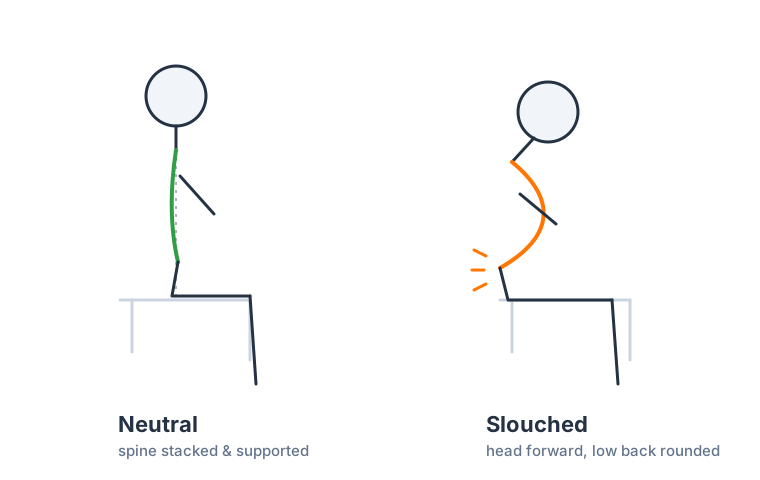
Here's the mechanism in brief. A healthy lumbar spine holds a gentle inward curve that lets your muscles, discs, and joints share load efficiently. Sink into an unsupported chair for hours and that curve tends to collapse into a slump — the supporting muscles switch off, and the discs and facet joints carry more than their share. None of it hurts in a given minute; it's the sustained load, repeated across a workweek, that turns into a persistent ache.
How Your Workstation Causes Back Pain
Desk-related back pain rarely traces to one thing. It builds from a workstation that isn't set up for your body, held for a full day. The most common contributors are:
- A chair without lumbar support, so your low back rounds and slumps instead of keeping its natural curve — the single most common culprit.
- A screen that's too low or off to one side, which pulls you into a hunched, twisted posture that your lower back has to compensate for all day.
- A seat that's the wrong height, leaving your feet dangling or your knees jammed up, so your pelvis tilts and the lumbar curve changes.
- A keyboard or mouse placed too far away, making you lean forward out of the chair's support and round your back toward the desk.
- Long stretches without a break, so the muscles never get a chance to reset and the same load just accumulates hour after hour.
It also feeds on itself. Sit slumped for enough hours and the muscles and joints adapt to that pattern, so an ergonomic problem gradually becomes a posture problem that follows you away from the desk too.
Common Symptoms
Back pain from desk work has a recognizable rhythm:
- A dull ache or stiffness across the lower back that builds through the workday, worst late in the afternoon
- Pain that eases when you stand, walk, or change position and returns once you settle back into the chair
- Tired, tight muscles in the low back and often up into the mid-back and shoulders
- Discomfort that's better in the morning and on weekends and tracks your working days
- Stiffness when you first stand up from a long stretch of sitting, easing after a few steps
The tell-tale sign is that it follows your work schedule and responds to movement. Pain that instead travels down a leg, or arrives with numbness or tingling, points toward a nerve being involved and is worth having looked at sooner — that shades toward sciatica rather than simple desk strain.
Who's Most at Risk?
Anyone who works at a desk can develop it, but it's most common in:
- Office and remote workers seated most of the day
- People with improvised home setups — kitchen tables, couches, and laptops on laps are frequent offenders
- Anyone who works long hours without movement breaks
- People with a weak or deconditioned core, whose spine gets less support in the chair to begin with
- Those who already have low-back stiffness or a prior back injury that a full day of sitting reaggravates
Setting Up Your Workstation to Prevent Back Pain
A handful of workstation changes can dramatically reduce desk-related back pain — and they're the difference between short-term relief and a fix that lasts. Here's what the same body looks like at a poor setup versus a supported one:
Aim for these:
- Support your lower back. Choose a chair whose backrest fits your lumbar curve, or add a lumbar cushion or rolled towel so your low back keeps its inward curve instead of rounding.
- Set your seat height so your feet rest flat and your knees sit roughly level with your hips, keeping the pelvis neutral. A footrest helps if your chair sits high.
- Raise your monitor to eye level and place it squarely in front of you, so you aren't leaning or twisting toward the screen.
- Keep your keyboard and mouse close so you can stay back in the chair's support rather than reaching forward and rounding your back.
- Alternate sitting and standing. A sit-stand desk helps most by letting you change position — the goal is variety, not standing all day, which brings its own aches.
What to Expect at Thrive Chiropractic
At Thrive Chiropractic in Troy, MI, care for desk-related back pain is conservative and built around your exam and your actual workday. Once a full day of sitting has stiffened joints and tightened muscles, the ergonomic fixes above help going forward — but self-care alone often isn't enough to fully undo what has already built up. That's where hands-on care comes in. Dr. Rubinstein typically combines chiropractic adjustments to restore motion to stiff lumbar and pelvic segments, soft-tissue and massage therapy to release the muscles a day of slumping keeps tight, and posture and ergonomic coaching so the strain doesn't rebuild every afternoon. When foot mechanics add uneven load, custom orthotics may be part of the plan, and if desk strain has layered on top of a disc issue, spinal decompression can enter the conversation.
The plan is honest about what's realistic: chiropractic care plus workstation changes relieve desk-related back pain and help you move better — it isn't a one-time cure, and lasting relief comes over a series of visits as the pattern changes. You'll get a specific timeline after your exam.
When to See a Chiropractor
A little end-of-day stiffness that clears overnight is normal. It's worth getting evaluated when back pain from desk work keeps coming back through the workweek, doesn't ease with the ergonomic changes and rest, or starts to interfere with sleep, focus, or the things you enjoy. Getting ahead of it gives conservative care and a workstation fix the best chance to work before a short-term ache settles in.
A small set of symptoms, though, are true emergencies and should never be waited out or blamed on a bad chair.
Short of those emergencies, radiating leg pain, numbness, or tingling are all good reasons to be seen sooner rather than later. When you're ready, you can schedule a visit with Dr. Rubinstein for a thorough exam, an honest read on how your workday is affecting your back, and a conservative plan built around your specific workstation.
Frequently Asked Questions
Desk-related back pain raises a lot of practical questions — why sitting at a desk hurts your low back, how to set up your workstation, whether a standing desk helps, and how it differs from back pain while sitting. Those are answered in detail in the FAQ section on this page.
If your back aches by the end of the workday, schedule a visit with Dr. Rubinstein at Thrive Chiropractic in Troy, MI. You'll get a thorough exam, an honest read on the cause, and a conservative plan aimed at relieving the pain and keeping your workstation from rebuilding it. You can also explore the wider Back Pain library for related topics like back pain from poor posture.
Back Pain Relief Guide (PDF)A one-page take-home guide: simple steps that help now, what's usually behind back pain, and the warning signs that mean it's time to see a doctor.PDFThis article is for general education and is not a substitute for professional medical advice, diagnosis, or treatment. Always consult a qualified healthcare provider about your specific situation.
Frequently Asked Questions
Why does my lower back hurt after sitting at a desk all day?
A full day at a poorly set-up desk usually lets your low back round and slump while an unsupported chair does nothing to hold its natural curve. The muscles that should support your spine switch off, the discs and joints take more load, and by afternoon you feel it as aching and stiffness. Fixing the workstation removes the strain at its source.
How do I set up my desk to avoid back pain?
Support your low back with a lumbar cushion or a chair that fits its curve, raise your monitor so the top is at eye level, keep your keyboard and mouse close, and alternate between sitting and standing through the day. Then add a short movement break every 30 minutes. Those changes take the sustained load off your spine that a workday otherwise builds up.
Is a standing desk better for back pain?
A sit-stand desk helps mainly because it lets you change position — and variety is what your back likes. Standing all day can create its own aches, so the goal isn't to stand constantly but to alternate. Switching between sitting and standing every so often spreads the load around instead of concentrating it in one posture.
Can a chiropractor help with back pain from office work?
Yes. Chiropractic care restores motion to the segments a full day of sitting has stiffened, relieves the muscle tension it creates, and pairs that with ergonomic coaching so the strain doesn't simply rebuild each afternoon. Dr. Rubinstein will build a plan around your specific workday and workstation.
How is this different from back pain while sitting?
They're two sides of the same problem. 'Back pain while sitting' explains the mechanism — why the seated position itself loads your spine. This guide is the practical fix: how to set up your chair, desk, and monitor and structure your day so that mechanism stops working against you at the office.
Ready to get evaluated at Thrive Chiropractic?
Dr. Rubinstein will assess what’s really going on and build a care plan tailored to you. Reach out and we’ll get you scheduled.
2133 Crooks Road | Troy MI 48084